
What a Teletype Phone Is and When Workplaces Still Need It
Learn what a teletype phone is, how TTY works, and when workplaces still need it for ADA, Section 508, VoIP, and emergency access.
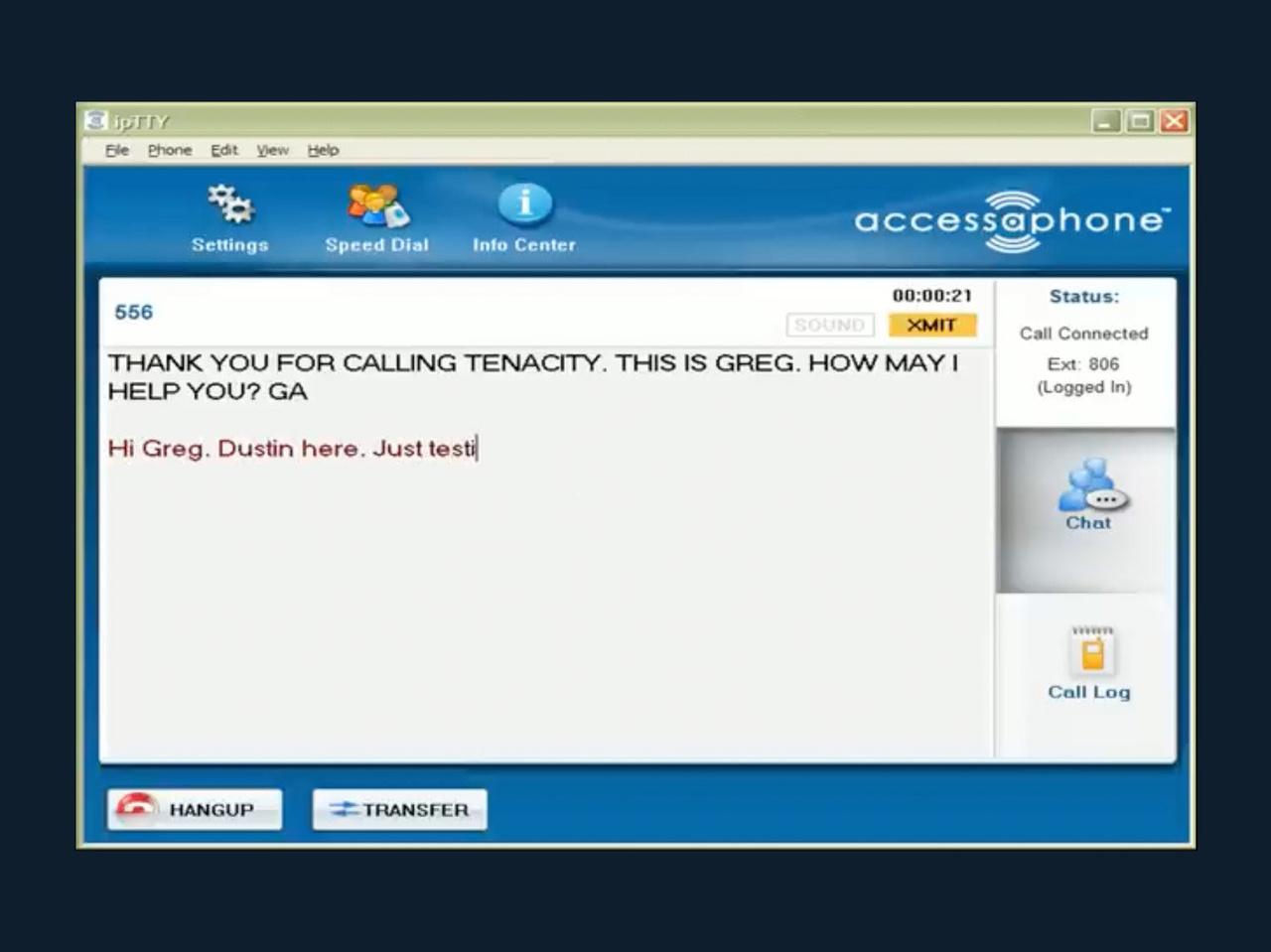
A teletype phone may sound like a legacy technology, but it still matters in many workplace communication plans. For employees, customers, patients, students, constituents, and public callers who are Deaf, hard of hearing, DeafBlind, or who have speech disabilities, text-based telephone access can be the difference between being included and being blocked from a basic business interaction.
The challenge for modern organizations is that “phone” no longer means one thing. Many enterprises have moved from analog lines to VoIP, unified communications, softphones, Cisco desk phones, contact centers, and cloud telephony. At the same time, accessibility obligations have not gone away. In some environments, TTY access is still required, expected, or necessary as part of a broader accessible communications strategy.
This guide explains what a teletype phone is, how it works, and when workplaces still need it in 2026.
What Is a Teletype Phone?
A teletype phone is a telephone communication device or software interface that lets people type and read conversations over a phone connection instead of relying only on spoken audio. In accessibility contexts, it is most often called a TTY, short for teletypewriter. You may also see the term TDD, which means telecommunications device for the Deaf.
Traditional TTY devices use a keyboard and display. A user types a message, and the device transmits tones over the telephone network. The person on the other end reads the text on their own TTY device or communicates through a relay service.
In practice, “teletype phone” can refer to several related setups:
| Term | What it means | Workplace relevance |
|---|---|---|
| TTY | A teletypewriter used for text communication over phone lines | Still used by some individuals and organizations for accessible calling |
| TDD | Telecommunications device for the Deaf, often used interchangeably with TTY | Older but still recognizable term in policies and procurement documents |
| TTY over IP | Software or system support that carries TTY communications across IP-based phone networks | Important for organizations using VoIP instead of analog lines |
| Relay service | A service that enables TTY users and voice phone users to communicate through an operator or automated system | Essential when one party uses voice and the other uses TTY |
| RTT | Real-time text, where characters are transmitted immediately as they are typed | A newer text communication technology that may complement or replace TTY in some environments |
The key idea is simple: a teletype phone gives someone a text-based way to use the telephone system.
How TTY Communication Works
A TTY conversation is not the same as texting, email, chat, or captioning. It is a telephone-based text conversation designed to work across phone networks.
In a direct TTY-to-TTY call, both callers use compatible TTY equipment or software. One person types, the other reads, and they take turns responding. Traditional TTY conversations often include conversational abbreviations such as “GA” for “go ahead,” which signals that the other person can type.
When a TTY user needs to call someone who uses a standard voice phone, they can use a telecommunications relay service. In the United States, the Federal Communications Commission explains Telecommunications Relay Services as services that allow people with hearing or speech disabilities to place and receive telephone calls. Many users can reach relay services by dialing 711.
A typical relay call works like this:
- The TTY user types their message to the relay service.
- A communications assistant reads the typed message aloud to the voice phone user.
- The voice phone user speaks their response.
- The communications assistant types the response back to the TTY user.
In workplaces with VoIP or unified communications systems, TTY may require additional planning. TTY tones were originally designed for analog telephone networks. When voice traffic is compressed, packetized, or routed across IP infrastructure, TTY reliability can be affected if the environment is not configured or supported properly. That is why TTY over IP support and accessible telephony software remain important for enterprise environments.
Is a Teletype Phone the Same as Captioning or Real-Time Text?
No. These tools are related, but they solve different accessibility needs.
Captioning converts spoken audio into text so a person can read what is being said. It can be very useful for people who are hard of hearing, people in noisy environments, or employees who need visual reinforcement during calls.
Real-time text, often called RTT, transmits text instantly as it is typed. The FCC describes real-time text as text that is sent immediately, character by character, without requiring the sender to press “send.” RTT is designed for IP-based communications and is increasingly important as networks modernize.
TTY, by contrast, is a long-established telephone accessibility technology with deep support in relay services, legacy systems, and many accessibility policies. It may not be the newest technology, but it remains part of the communication landscape.
A mature workplace accessibility plan does not assume one tool works for everyone. Some users may prefer captioning. Some may need TTY. Some may use RTT, relay services, speech-to-speech services, video relay, or a combination of tools depending on the situation.
Why Workplaces Still Need to Understand TTY in 2026
It is tempting to think that smartphones, chat apps, and video meetings have made TTY obsolete. For some users and use cases, newer tools are better. But workplaces still need to understand teletype phone access for five practical reasons.
First, not every caller uses the same technology. An employee may use modern collaboration tools internally but still need to contact an external agency, vendor, benefits provider, healthcare office, or emergency service through a TTY-compatible channel.
Second, many organizations still publish phone numbers as a primary access point. If a customer or member of the public can only complete a task by calling, the organization needs to consider how people with hearing or speech disabilities can complete that same task effectively.
Third, compliance frameworks continue to emphasize effective communication. The U.S. Department of Justice guidance on ADA effective communication explains that covered entities must communicate effectively with people who have communication disabilities. The specific auxiliary aid or service depends on the situation, but telephone accessibility can be part of that obligation.
Fourth, federal agencies and organizations working with federal information and communication technology may need to consider Section 508 requirements. Section508.gov provides guidance on accessibility requirements for federal ICT. For workplaces in federal, public sector, education, healthcare, defense, and contractor environments, procurement and telephony decisions often need a more formal accessibility review.
Fifth, emergency communication is different from everyday convenience. A workplace may be comfortable using chat for routine communication, but emergency calling, security desks, incident response, and life-safety workflows require reliable, accessible access for all users.
When Workplaces Still Need a Teletype Phone
A workplace does not necessarily need a physical TTY device on every desk. However, it may still need TTY capability, TTY over IP support, or a compatible accessible telephony solution in several situations.
| Workplace situation | Why TTY may still be needed | What to evaluate |
|---|---|---|
| An employee requests a communication accommodation | Employers may need to provide effective tools that allow the employee to perform essential job functions | The employee’s preferred communication method, job duties, call volume, privacy, and emergency needs |
| The organization serves the public by phone | Customers, patients, students, constituents, or applicants may use TTY or relay services | Inbound call handling, published accessibility contact options, staff training, and response procedures |
| The workplace uses VoIP or Cisco-based telephony | Legacy TTY behavior may not automatically work across IP networks | TTY over IP support, endpoint compatibility, routing, testing, and vendor documentation |
| The organization has federal or public sector accessibility obligations | Section 508, ADA, state laws, procurement rules, or contract requirements may apply | Accessibility conformance, documentation, support, and audit readiness |
| Emergency or security calls are part of the environment | People with hearing or speech disabilities need reliable emergency communication options | 911 access, internal emergency numbers, NG 9-1-1 planning, and fallback procedures |
| A legacy analog system is being replaced | Accessibility features can be lost during migration if not addressed early | Migration testing, user acceptance, policy updates, and training |
The most important point is that TTY need should be based on real communication requirements, not assumptions. If a user needs TTY, replacing it with an unrelated tool may not provide equal access. If a newer technology better meets the user’s needs, that may be appropriate too. The decision should be intentional, documented, and tested.
Compliance Considerations for ADA, Section 508, and Emergency Access
Accessibility compliance is not just about owning a device. It is about whether people can communicate effectively in real situations.
Under the ADA, different rules may apply depending on whether the organization is an employer, public entity, or public accommodation. In employment settings, communication tools may be part of a reasonable accommodation process. For public-facing services, accessible telephone communication may be part of effective communication with customers, clients, or the public.
Section 508 is especially relevant for federal agencies and organizations that provide, procure, develop, or maintain covered ICT for federal use. If a phone system, softphone, desktop application, or communication platform is part of that ICT environment, accessibility should be considered during procurement and implementation, not added as an afterthought.
Emergency communication adds another layer. The FCC’s text-to-911 guidance notes that text-to-911 availability depends on the area and service support. For workplaces, this means it is risky to assume that consumer texting alone covers every emergency accessibility scenario. Organizations should review local emergency options, enterprise phone system behavior, internal safety procedures, and NG 9-1-1 readiness.
This article is not legal advice, but the practical takeaway is clear: accessible phone communication should be part of IT, HR, facilities, legal, procurement, and emergency planning.
TTY in Modern VoIP and Unified Communications Environments
Many accessibility gaps appear during phone system modernization. A workplace may retire analog lines, deploy VoIP, roll out softphones, or consolidate sites into a unified communications platform. If accessibility is not included in the migration plan, users who relied on TTY or relay-compatible calling can lose functionality.
Common modernization questions include:
- Can the phone system support TTY over IP where needed?
- Will TTY calls work reliably through gateways, trunks, call managers, and endpoints?
- Are accessible desktop applications available for users who cannot use traditional phone hardware?
- Can employees use screen readers, keyboards, alternative input devices, or captioning where appropriate?
- Are emergency calls, internal help lines, security desks, and contact centers included in testing?
- Do receptionists, help desk teams, and call center staff know how to handle relay calls properly?
Testing is especially important. A procurement document may say a system supports accessibility, but real users need to complete real tasks. For example, a TTY user may need to call HR, join a support queue, contact security, reach a supervisor, or receive an urgent message. Those workflows should be validated before the old system is removed.
When a Teletype Phone May Not Be the Best Primary Option
TTY is still important, but it is not always the best default for every user. Some people who previously used TTY now prefer other accessible communication tools.
Enterprise captioning can help people read spoken content during calls or meetings. Real-time text can support faster text communication in IP environments. Video relay services may be preferred by people who use sign language. Speech-to-speech relay can support people with speech disabilities. Accessible softphones and desktop telephony interfaces can help users with vision or mobility disabilities manage calls more effectively.
The right question is not “Is TTY old?” The right question is “What communication method gives this person effective, reliable, private, and timely access?”
In many workplaces, the answer is a combination of tools. TTY may remain necessary for specific users, external callers, relay compatibility, emergency workflows, or legacy environments, while captioning, RTT, and accessible desktop applications improve communication in other contexts.
How to Decide Whether Your Workplace Still Needs TTY Capability
A practical assessment can prevent both underinvestment and overbuying. Before purchasing hardware or removing legacy support, review the people, systems, and obligations involved.
- Identify who relies on telephone communication: Include employees, applicants, customers, patients, students, visitors, vendors, and members of the public.
- Review accommodation requests and known accessibility needs: Do not assume all users with hearing, speech, vision, or mobility disabilities need the same tool.
- Map critical call flows: Include HR, IT support, reception, contact centers, emergency lines, security desks, executive assistants, and after-hours numbers.
- Check legal and procurement requirements: Review ADA, Section 508, state accessibility rules, contract language, and internal accessibility policies.
- Evaluate the phone environment: Document analog lines, VoIP systems, Cisco phones, softphones, call routing, gateways, and contact center platforms.
- Test with real scenarios: Validate inbound calls, outbound calls, relay calls, emergency procedures, transfers, queues, voicemail, and failover.
- Train staff: Make sure employees know how to recognize and handle TTY and relay calls professionally.
This type of assessment is also useful during mergers, office relocations, return-to-office planning, phone system upgrades, and NG 9-1-1 readiness projects.
What to Look for in an Accessible Telephone Solution
For enterprise environments, the goal is not just to find a device that works in isolation. The goal is to support accessible communication across the workplace.
Look for solutions that align with your current and future phone architecture. If your organization uses IP telephony, ask specifically about TTY over IP support. If your environment includes Cisco phones, confirm integration details. If users need desktop-based access, evaluate whether the interface works with keyboard navigation, screen readers, visual alerts, captions, or other accessibility tools.
Support also matters. Accessibility failures often happen at the intersection of telecom, compliance, and user needs. A vendor that understands accessible telephony can help IT teams ask the right questions, test the right workflows, and avoid losing accessibility during modernization.
For many organizations, the strongest approach is a layered communication strategy that may include TTY support, real-time text, enterprise captioning, accessible phone system software, and expert consultation.
Frequently Asked Questions
Is a teletype phone still used today? Yes. While many people now use newer tools such as real-time text, captioning, video relay, or messaging, TTY and TTY-compatible services are still used in some workplaces, public services, relay calls, and emergency communication scenarios.
Is a teletype phone required by the ADA? The ADA does not simply require every workplace to buy a specific TTY device. It requires effective communication and, in employment contexts, may require reasonable accommodations. TTY may be the right solution in some situations, while another accessible communication tool may be appropriate in others.
What is the difference between TTY and TTY over IP? Traditional TTY was designed for analog telephone networks. TTY over IP refers to support for TTY communication in IP-based phone environments, such as VoIP and enterprise unified communications systems.
Can a workplace replace TTY with captions or chat? Sometimes, but not automatically. Captions, chat, and real-time text can be excellent tools, but they may not meet every user’s needs or every external calling requirement. Workplaces should evaluate the specific communication task, user preference, legal obligation, and reliability need.
Do relay calls matter for businesses? Yes. A relay call may be how a person with a hearing or speech disability contacts your organization by phone. Staff should be trained not to hang up on relay calls and to handle them with the same professionalism and privacy as any other call.
Should TTY be included in VoIP migration planning? Yes. If your organization is replacing analog phones, moving to VoIP, or changing call routing, accessibility should be tested before the old system is retired. TTY functionality, relay calls, captions, emergency calls, and accessible desktop tools should all be considered.
Build Accessible Workplace Communication With Tenacity
A teletype phone is not just a legacy device. For the right user or workflow, it is a critical access point. As workplaces modernize their phone systems, accessibility needs to move with them.
Tenacity helps organizations provide accessible workplace communication through accessible phone system software, TTY over IP support, enterprise captioning solutions, real-time text communication, Cisco phone integration, and expert consultation. If your organization is reviewing ADA, Section 508, VoIP, or NG 9-1-1 readiness, Tenacity can help you plan communication access that works in the real world.
To explore accessible telephone solutions for your workplace, visit Tenacity.